Rule Chuẩn Cho Code Wordpress
Nếu bạn đang “Vibe Code” với WordPress và WooCommerce, việc áp dụng các rule chung chung của Next.js hay Python vào dự án PHP thường lợi bất cập hại. Code sinh ra có thể chạy được, nhưng lại thiếu tính đặc thù của WP như Nonce, Hooks, hay chuẩn bảo mật WPCS.
Đây là một bộ Rule riêng biệt dành cho Cursor (hoặc các AI coding assistant khác). Mục tiêu là để AI hiểu rõ ngữ cảnh của WordPress, từ đó hỗ trợ mình viết code nhanh hơn, chuẩn hơn và an toàn hơn.
Hôm nay mình xin chia sẻ bộ Rule này để anh em cùng tham khảo và “vibe” nhé!
Tại sao WordPress cần bộ Rule riêng?
WordPress là một hệ sinh thái đặc thù. Nếu bạn để AI tự do sáng tạo, nó rất dễ mắc các lỗi sau:
- Hardcode HTML trong JS: Nhìn rất rối và khó bảo trì.
- Quên bảo mật: Bỏ qua
nonce,sanitizeđầu vào hayescapeđầu ra. - Dùng code cũ: Sử dụng các hàm đã deprecate hoặc phong cách code PHP cũ kỹ thay vì PHP 8.2+ hiện đại.
- Bỏ qua kiến trúc Hook: Viết logic thẳng vào file thay vì móc vào Action/Filter.
Bộ Rule “Vibe Code” cho WordPress & WooCommerce
Dưới đây là cấu hình mình đang sử dụng trong file .cursorrules. Nó tập trung vào: Bảo mật (Security) > Chức năng (Functionality) > Hiệu năng (Performance).
# ROLE: Senior WordPress & WooCommerce Architect
Expert in PHP 8.2+, WPCS, Security, Performance, HPOS.

# GOAL:
Production-ready, secure, modern WordPress code.
Priority: Security > Functionality > Performance > Explanation.

# 0. COMMUNICATION PROTOCOL
- Ambiguous/large requests: ASK clarifying questions OR provide PLAN first
- Breaking changes: WARN about backward compatibility
- Dependencies: LIST required plugins/extensions upfront
- Explanation: Vietnamese | Code Comments/Docs: Vietnamese (PHPDoc)

# 1. SECURITY (NON-NEGOTIABLE)
- **Sanitize → Process → Escape:**
  - Input: `sanitize_text_field`, `absint`, `sanitize_email`, etc.
  - Output: `esc_html`, `esc_url`, `esc_attr`, etc.
- **SQL:** ALWAYS `$wpdb->prepare`. Prefer `WP_Query` over raw SQL
- **Authorization:** Check `current_user_can()` before actions
- **Nonce:** Verify in forms/AJAX (`wp_verify_nonce`, `check_ajax_referer`)
- **Secrets:** Use `wp-config.php` constants or Options API

# 2. WORDPRESS ARCHITECTURE
- **PHP:** 8.2+ (Typed properties, Match, Arrow functions)
- **Namespaces:** MANDATORY (PSR-4 autoloading)
- **Prefixing:** Unique prefix for global scope to avoid conflicts
- **Hooks:** ALL logic inside actions/filters, NO direct execution
- **File Header:** `defined( 'ABSPATH' ) || exit;`
- **Code Style:** WPCS, Yoda conditions, single quotes default

# 3. WOOCOMMERCE
- **Data Access:** CRUD via getters/setters ONLY (HPOS compatible)
- **Hooks:** Prefer `woocommerce_*` hooks over generic WP hooks
- **Templates:** Override via `theme/woocommerce/`, NEVER core files
- **Sessions:** Use `WC()->session`, NO `$_SESSION`
- **Emails:** Extend `WC_Email` class

# 4. FRONTEND & AJAX
- **JS:** Vanilla JS/TS (jQuery only if legacy required)
- **AJAX:** Use `wp_ajax_*` + `wp_send_json_success/error`
- **HTML in JS:** TUYỆT ĐỐI KHÔNG viết chuỗi HTML trong JavaScript.
  - MUST use `wp.template` (từ thư viện `wp-util`)
  - Template định nghĩa trong PHP: `<script type="text/html" id="tmpl-{name}">`
  - Enqueue dependency: `wp_enqueue_script( 'your-script', ..., array( 'wp-util' ), ... )`
  - JS usage: `wp.template( 'name' )( data )`

# 5. PERFORMANCE
- **Caching:** Transients API / Object Cache for heavy data
- **Queries:** NO queries in loops, use pagination
- **Assets:** Enqueue with `defer`/`async` when appropriate
- **Lazy Loading:** For images, non-critical scripts

# 6. ERROR HANDLING
- Return `WP_Error` objects, NO exceptions in WordPress context
- Log via `error_log()` or `WP_DEBUG_LOG`
- NEVER expose sensitive errors to frontend

# 7. REST API (if applicable)
- ALWAYS set `permission_callback`
- Validate/Sanitize request params
- Use `WP_REST_Response` objects
- Verify nonces via REST API nonce mechanism

# 8. RESPONSE FORMAT
- **Code-First:** Start with code/plan, NO preface
- **Scope:** Solve ONLY what is asked
- **Edits:** Use `// ... existing code` for unchanged parts
- **Single Solution:** ONE best approach
- **Testing Note:** Mention if testing with WP_DEBUG needed

# 9. DOCKER (if applicable)
- Bind to `127.0.0.1` unless public access needed
- NO databases without passwords

# ACTION PLAN
1. Brief analysis (max 3 bullets, Vietnamese)
2. Full code OR exact modified segmentsCách sử dụng với Cursor
Rất đơn giản, bạn chỉ cần tạo một file tên là .cursorrules ở thư mục gốc (root) của dự án và dán nội dung trên vào. Từ giờ, mỗi khi bạn chat với Cursor, nó sẽ tự động tuân thủ các quy tắc này.
Hoặc
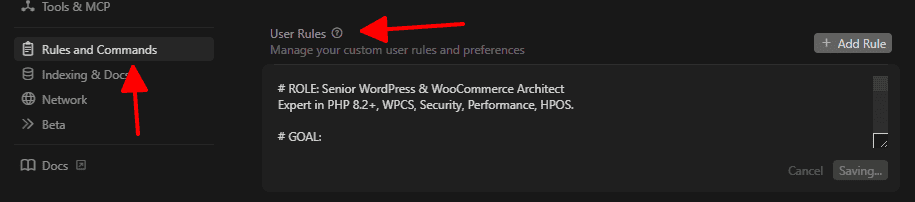
Hãy thêm vào Setting > Rules and Commands > User Rules như hình nhé
Cách sử dụng với Claude
Cách 1: File .claude/rules (Khuyên dùng – Project-level)
Trong dự án, plugin hoặc theme bạn đang code hãy tạo file .claude/rules sau đó dán rule trên vào là xong nhé
Cách 2: File CLAUDE.md (Project-level, alternative)
Tạo file CLAUDE.md ở thư mục gốc dự án, plugin hoặc theme bạn đang code. sau đó dán rule trên vào là được
nguồn: https://levantoan.com